Photobucket

RECENT POST

Tukeran link

Jacko Bogor
Showing posts with label Download. Show all posts

Thursday, March 3, 2011

Solusi Tepat Cari Driver Komputer / Laptop Anda


Jika suatu saat kamu bingung dalam mencari driver komputer / laptop. Kamu bisa menggunakan cara alternatif dalam mencari driver-nya. Caranya dengan menggunakan ID device dan bantuan dari situs Devid.info. Nah,, pada postingan kali ini Urang Bogor akan memberikan sedikit tips jika kamu bingung dalam mencari driver untuk komputer / laptop. Solusinya dapat menggunakan bantuan dari situs devid.info caranya? Perhatikan hal-hal berikut ini :

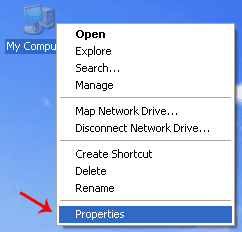
  • Klik kanan pada My Computer. Trus pilih Properties.

Properties My Computer - Image by MeNDHo.com

  • Kemudian akan muncul jendela System Properties.
Pilih tab Hardware -> Device Manager.

System Properties - Image by MeNDHo.com

  • Setelah jendela dari Device Manager terbuka. Kemudian pilih salah satu device yang belum terinstall driver-nya.
Klik kanan -> Properties.

Device Manager - Image by MeNDHo.com

  • Setelah itu, muncul jendela properties dari device tersebut.
Pilih tab Details -> Klik ID device -> Kemudian copy ID dari device tersebut dengan menekan Ctrl + C.

Copy Device ID - Image by MeNDHo.com

  • Selanjutnya, buka situs Devid.info. Kemudian paste ID device yang sudah di copy tadi pada kotak “Enter Device Id”. Trus klik “OK”.
Devid.info - Image by MeNDHo.com

  • Nanti akan muncul beberapa pilihan driver yang ingin di download. Kemudian pilih salah satu. Trus klik Download.
Pilih Driver - Image by MeNDHo.com

  • Nah,, tinggal di download dah tuh driver-nya.

Download Driver - Image by MeNDHo.com
Semoga dapat menjadi solusi alternatif bagi kamu dalam mencari driver komputer / laptop,, 
ReadMore

Wednesday, May 12, 2010

Avira AntiVir 10 (New Version)

Avira Antivir 10 have been provided for download, at this time release the latest avira already equipped with the latest technology in banish the virus and repair the damage caused by computer viruses. In addition to releasing 10 avira, avira parties also made various improvements to the Avira Antivir Personal-Free Antivirus version 10 and Antivir Security Suite. Looks like Avira 10 focuses more on Cyber Via the Internet. Because so many additions and reinforcement on some items Firewall and network security. 10 It's spelled Avira antivirus that lightly because we only need a minimum 192 Mb RAM (for Windows XP) and 512 Mb (for windows vista and windows 7) and 100 Mb free hard disk space during installation.


Several new features offered in this latest version of Avira, among others:
  • AntiVir ProActiv which have the ability Behavior-based protection. This adds an additional layer of protection by introducing analysis program "to help detect patterns of behavior in addition to malware scanning and heuristic methods.
  • Security system that can handle 100 million more a virus that developed out of Avira Community
  • Generic Feature Repair. With this capability, Avira not only remove viruses, trojans or malware, but also repair damage caused by the malware.
  • The installation process is quick and transparent user interface, easy-virus removal process.
  • Parental Control feature in Avira AntiVir Suite, including controls on hours of Internet surfing, which will be very useful for parents to monitor their children's activities on the internet.
If you want to try the features of Avira antivirus version 10 you can be downloaded for free at the link:

ReadMore

Tuesday, April 27, 2010

Tune-Up Utilities 2010

TuneUp Utilities 2010 is a popular software utility to fine tine, optimize, maintain and troubleshoot Windows computer system. With TuneUp Utilities, users can make PC fast and stable, tweak or customize Windows easily, and even fix issues or problems commonly affected Windows operating system. The newest version of TuneUp Utilities, TuneUp Utilities 2010 version 9.0 has been released, with full compatibility with Windows 7, Windows Vista And Windows XP.


Features of TuneUp Utilities 2010:
  • Supports Windows XP, Windows Vista and Windows 7 operating system.
  • Runs on both the 32-bit and 64-bit versions of Windows XP, Windows Vista and Windows 7.
  • Turbo Mode to disable many unnecessary functions in XP, Vista, and Windows 7 that run in the background and are often hardly needed to harness full power for actively running programs.
  • TuneUp Live Optimization to improve response times by preventing background processes from taking up too much of the PC’s resources, and accelerate program startup times.
  • TuneUp Utilities Gadget to show the system health on the desktop and give direct access to TuneUp Utilities functions (for Vista and Windows 7).
  • Completely redesigned TuneUp Utilities Start Center shows system health at a glance and provides direct access to key functions.
  • 1-Click Maintenance and Automatic Maintenance.
  • Optimize system startup and shutdown.
  • Defragment hard disks and registry.
  • Remove broken shortcuts.
  • Clean registry.
  • Free up disk space.
  • Display and uninstall programs.
  • Fix typical problems.
  • Restore deleted data.
  • Manage running programs.
  • heck hard drive for errors.
  • Personalize Windows appearance such as startup and log-on screens.
  • Change more than 400 Windows settings.
The main surprise comes after TuneUp Utilities 2010 is launched. Despite the huge and vast functionality built-into TuneUp Utilities 2010, the Start Center is clean and uncluttered. Start Center is designed with four main pillars of TuneUp Utilities 2010 – Maintain System, Increase Performance, Fix Problems, and Customize Windows, where each displaying summary of the results and/or shortcuts to the most frequently used functions.

TuneUp Utilities 2010 is made up of many integrated small utilities such as Drive Defrag, Shortcut Cleaner, Registry Defrag, Registry Cleaner, Live Optimization, Free Up Disk Space, Startup Manager, Uninstall Manager, Process Manager, Disk Doctor, Undelete, Repair Wizard, Styler, System Control and many more. With so many functionality available, user who doesn’t know where to start can rely on 1-Click Maintenance or Automatic Maintenance which automatically perform various system maintenance routines (configurable) to maintain system in tip-top condition.

TuneUp Utilities 2010 also provies user recommendations on how to improve the performance of the PC. But user has to first create a profile to let TuneUp Utilities know you want to optimize the Internet, visual effects and installed applications. Then, TuneUp Utilities checks the system and gives recommendations in term of system performance, Internet settings, visual effects and uninstallation of unused programs.

Some modules of TuneUp Utilities 2010 is actually duplicate with built-in functionality of Windows OS, such as Disk Doctor for scanning disk drive for errors, and Drive Defrag. However, Registry Defrag and Registry Cleaner are nice add-ons to optimize system registry. We also like the new Turbo Mode, which allows user to disable unwanted running programs or processes and unnecessary visual effect at one go. The Repair Wizard which fixes common problems is useful, although the the problems it able to fix is rather limited. However, we like the fact that it can recommend us to disable remote registry access capability and administrative shares. The Styler and System Control are also very useful tools which provide one-stop access to many settings and options available in Windows which otherwise users may have to spend more time just to find where to change the settings, or unable to change.

Last but not least, the TuneUp Rescue Center provides backups and ability to restore any changes that are been made by the program, which make it an indispensable tool. It also double up as system recovery similar to Windows’ System Restore, and supports Windows’ restore points.

If you want to try this application you can get it through the link at the bottom of this article, Urang Bogor try to give a Tune-Up Utilities 2010 is the full version so that we can all use the Tune-Up Utilities, with comprehensive features that have been in accordance with our tried to describe above.

The following download link

ReadMore

Wednesday, April 14, 2010

Quick Media Converter 4.0

Quick the Media Converter 4.0 is an application that can convert your multimedia files quickly and easily. With Quick Media Converter 4.0 we can convert multiple files at once, and incredibly again 4.0 Quick Media Converter can also convert some types of multimedia files of different formats in a single process at once so no need to wait one by one.

Quick Media Converter 4.0 offers two options that is Easy and Expert mode, you stay in Easy mode and select the video output format desired. While for the Expert mode please specify the format in accordance with the video configuration you desire manually, if you want to generate the converted files have high quality? You just click the "HD".

Additionally Quick Media Converter 4.0 supports video and audio formats with complete, Quick Media Converter 4.0 are also useful as a catcher application didekstop activity through function "CamStudio", this function is already integrated in it so no longer need to install another application. You can also control the activity of its functions such as recording webcam images and video. And even more amazing is you can adjust the brightness, the video source to the resolution.

Quick Media Converter 4.0 also supports windows operating system from Windows 98, Windows ME, Windows XP to Windows Vista and Windows 7, Mantab right? Get this app for free by downloading it :

BannerFans.com

ReadMore

Friday, March 12, 2010

nLite 1.4.9.1

nLite is a useful program to create a bootable CD or DVD of Windows 2000, Windows XP, and Windows 7 Especially for laptop users or computers with integrated SATA hard drive with your computer, so you need to install the driver first so Hardisk SATA can be found in during the installation process windows on your laptop or computer. You can integrate service packs and hotfixes from Microsoft directly into your windows distribution files without having to re-download and install them every time you need to re-install windows.

besides that nLite can also encrypt some files windows and windows installation process, such as Serial number, User name, Groups, language, regional, and some other notification that can be automated so that the windows installation process we do not need to type some of these, and of course the installation process can run without the need for our monitor.

There is also the option to remove unwanted components from within windows. Many applications are automatically included every time windows is installed. Not every person needs or even wants all of these applications which Microsoft considers to be necessary. By removing these unwanted components you can free up space within your setup and ultimately save space on your hard drive after installation.

nLite also provides a way to customize your installation by allowing numerous tweaks to the way windows looks and operates after it has been installed. You can even bypass Microsoft's bulky unattended setup instructions and do it the easy way. The nLite way!

if you want to make a CD or DVD of Windows XP or Windows 7 itself please Download Here
Or Download This One To Create your Bootable CD or DVD for Windows Vista

ReadMore

Sunday, March 7, 2010

SmadAV 2010 Rev. 8.1

Smadav 2010 SmadAV Rev. 8 was released with a variety of new features and improvements that are specific to local eradication of the virus. That features such as Smad-Behavior that can identify new local virus that does not exist in the database SmadAV of his behavior when infecting the system. Smad-Ray that can scan automatically flash when installed within a maximum of 5 seconds. 2010 SmadAV more stable and highly recommended to be combined with international anti-virus because it can only handle SmadAV local virus.

In Rev. SmadAV 8 and earlier are still not 100% compatible on Windows Vista and Windows 7. But the Rev. This 8.1 SmadAV both scanner and his protector has supported and 100% compatible for use in Windows Vista and Windows 7.


The following is a complete list of improvements SmadAV Rev. 2010. 8.1:
  • Engine new scanner (SmadEngine.dll) to detect the virus more quickly and accurately.
  • External Database (Smadav.loov) to make it easier to update the database for the next revision.
  • Plug-in explorer right click on the latest (SmadExtc.dll) the better.
  • Compatible in Windows Vista & 7.
  • Detection of several viruses that many international spread in Indonesia (Sality & Alman) was more rapid and accurate.
  • Adding a database of more than 100 new viruses and their variants
  • Improved false alarm on some files.
  • Completion of key blacklist illegal methods SmadAV Pros
  • Changes SmadAV team structure for 2010
  • Added uninstall menu in the Tray Icon for easy uninstall
  • And many other improvements ...
For those of you who want to use antivirus SmadAV you can visit the official website or click the image for a direct download link download it ...

Ready To Go PRO? Download The Crack Here
ReadMore

Saturday, October 24, 2009

Download Patch, Crack And Serial Number

ReadMore

Free Download E-Book Gratis

ReadMore

Free Download Sofware

ReadMore

Thursday, October 22, 2009

Free Download Music And Video

ReadMore


Followers

TOP COMMENTATOR


English
French
German
Spain
Italian
Dutch
Japanese

Blog Stat

Rank Barudak Blogor